Stay focused on the conversation.
Follow your responses without repeatedly scrolling through the text.
VOXTERA AUTO SCROLL
Let your AI-generated responses advance automatically at your preferred reading pace, without constantly scrolling manually.
Real Voxtera AI auto-scroll demo
Watch how Voxtera advances responses inside the interview workspace. Select the muted video to pause or resume.
LESS FIDGETING. MORE FOCUS.
Auto Scroll keeps your attention on what matters: the conversation in front of you.
Follow your responses without repeatedly scrolling through the text.
Adjust how quickly your guidance advances to match your preferred reading speed.
Start, pause, and adjust Auto Scroll directly from your Voxtera workspace.
 FROM THE PRODUCT
YOUR HANDS ON THE WHEEL
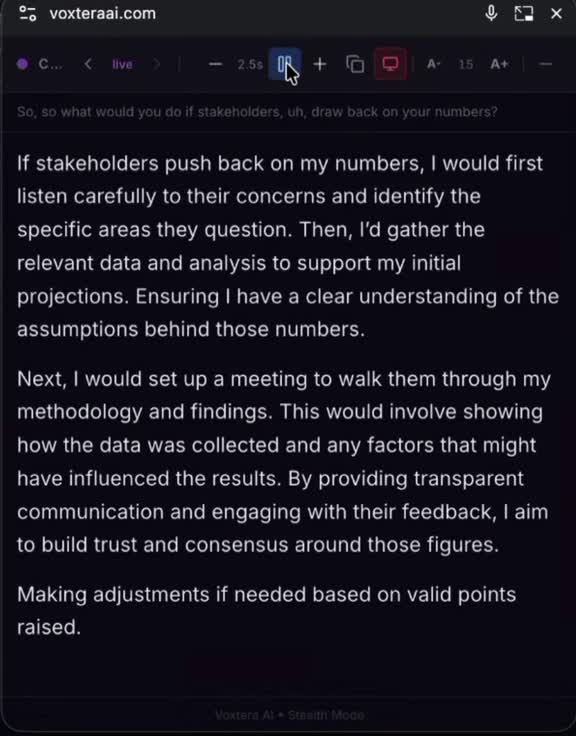
The visible toolbar gives you direct control over how guidance moves. The screenshot shows the compact controls in use.
This recording shows a 2.5-second reading-pause interval. In the current Live desktop toolbar, Auto-Scroll and Pause Scroll start and pause movement. Minus and plus adjust the speed level; select the displayed level to reset it to 0 (normal).
TAKE YOUR TIME BACK
Make room for the conversation, not the scrollbar.
Try Auto Scroll Free Explore the AI Interview Copilot